Add tags from the sidebar, rename them as your organization changes, and remove tags you no longer need.
Native project workspace for macOS
Project Browser
Stop hunting through a crowded Codex sidebar. Organize every project in one clear view, search and filter your workspace, inspect Git context, and return to recent work immediately.
Version 26.8.64 macOS 13+ Solo and team workflows Signed and notarized by Apple
Built for active Codex work
A growing Codex sidebar is not a project management system.
Codex's left sidebar is useful for recent chats, but it becomes cumbersome when work spans dozens of repositories. Project Browser turns that same local history into a visual workspace built for scanning, organizing, and returning to the right project.
Project overview
Scan current work at a glance
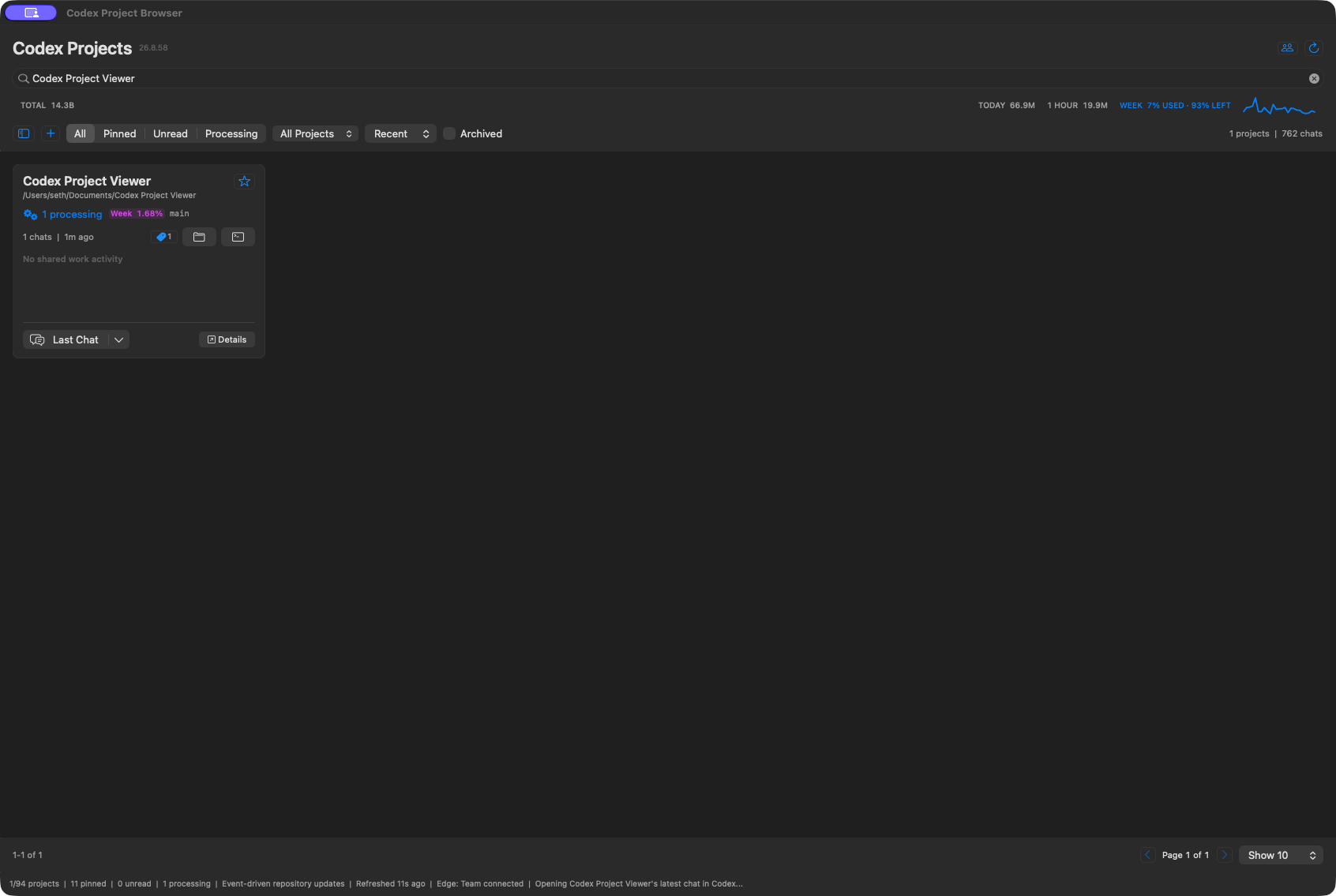
Project cards surface recent activity, processing state, each project's weekly allowance contribution, tags, Git branch, chat count, and direct actions.
Project tags
Create the project organization Codex's sidebar is missing.
Build a tag system around clients, products, platforms, or any workflow that matters to you. The tag sidebar stays available when you need it and disappears completely when you want more room for cards.
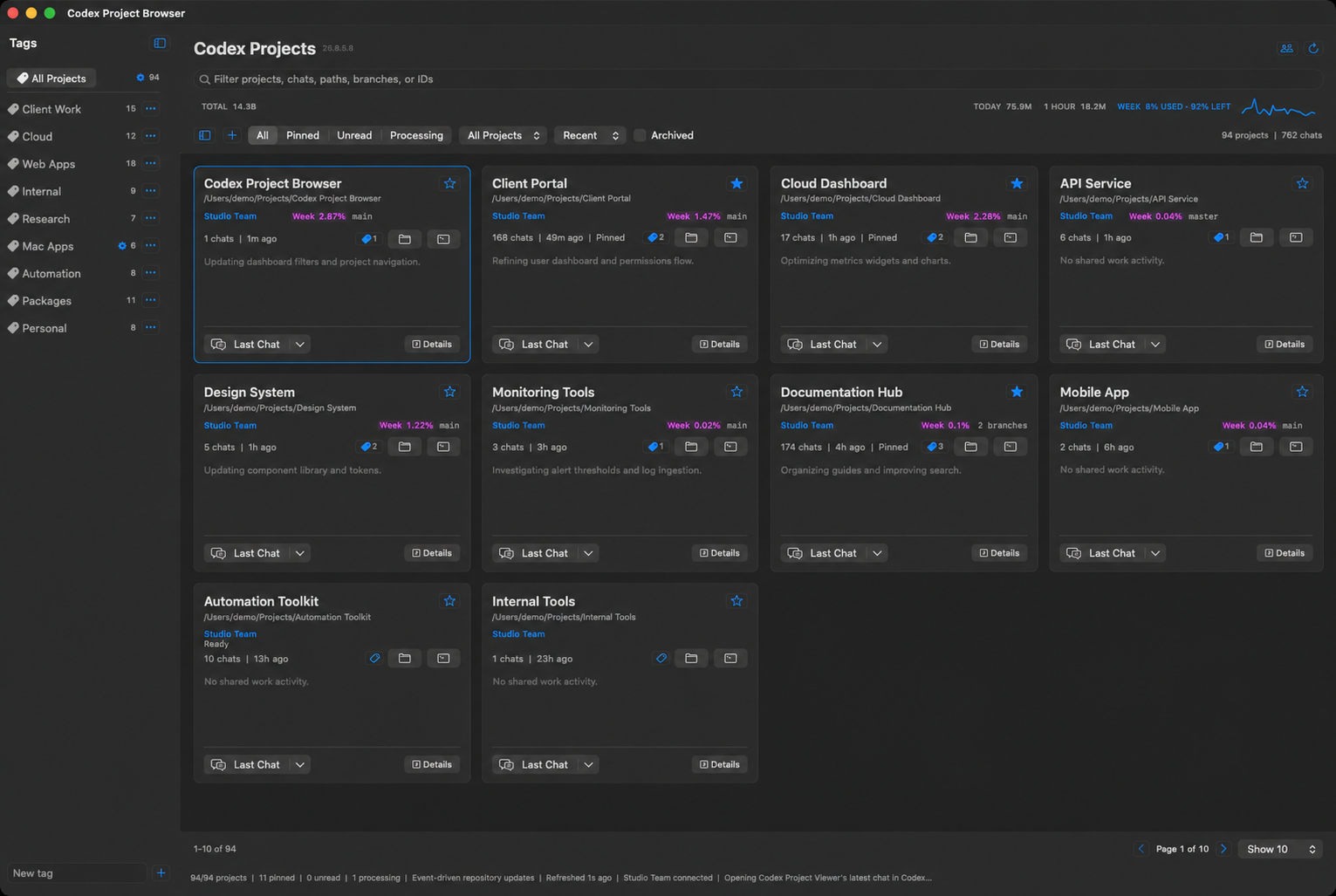
Use the compact tag picker on a project card to add or remove one or several tags without leaving the project list.
Select a tag to show only matching projects. New projects created while filtered automatically receive the active tag.
Simple pricing
Free locally. Pay only for Team coordination.
Project organization, Git context, tags, and personal usage analytics are free. A Team subscription adds shared repository activity, conflict indicators, roles, and combined project usage.
Local
$0
Unlimited local projects and no account required.
Team 10
$15 / month
Up to 10 device seats. $150 when billed yearly.
Team 100
$79 / month
Up to 100 device seats. $790 when billed yearly.
Local includes Tags, pins, filters, Git context, Markdown, recent Codex tasks, and personal token analytics.
Team includes Shared repository activity, work summaries, changed files, conflict indicators, roles, and combined project usage.
Billing The Team owner pays through Stripe. Yearly plans include two months at no additional charge. Manage or cancel billing from Team Settings.
Repository-aware teams
See who is working before you change the same code.
Project Browser identifies repositories shared by team members and turns local Git activity into lightweight coordination. You can see active work, changed files, recent commits, and potential overlap without opening another person's Codex conversation.
Match shared repositories
Projects connect when repository identity matches across team devices, even when each person keeps the checkout in a different folder.
Describe active work
See the teammate's name, a short Codex-generated work summary, branch, processing state, and the files currently changed but not committed.
Surface possible conflicts
Clear indicators distinguish general activity, same-branch caution, changed-file overlap, and high-risk overlap before work collides.
Useful after someone disconnects
The last reported project activity remains visible until that teammate's app reports a newer state, so closing the app does not erase context.
Private by design
Codex chats, prompts, responses, thread details, and raw code are never sent to teammates through Team sharing.
Token analytics by project
See which projects consume your Codex allowance.
Codex can show your account-level allowance. Project Browser adds project-level context by connecting local token activity to the work that consumed it.
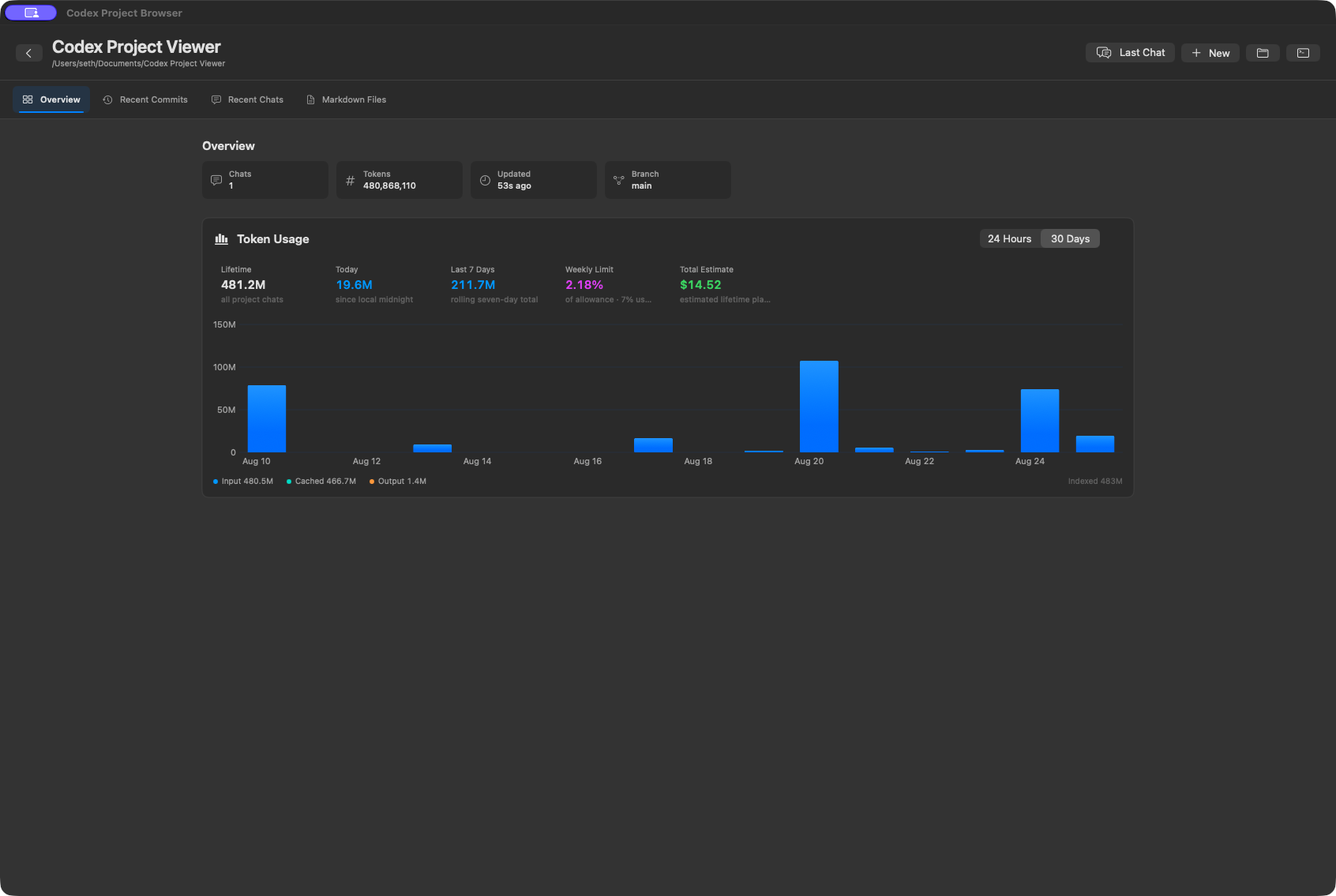
See how much of your used weekly allowance came from each project.
Compare today, the last seven days, and longer activity trends.
Review total project tokens and a clearly labeled lifetime estimate.
Team details can show member totals and combined repository usage.
Project details
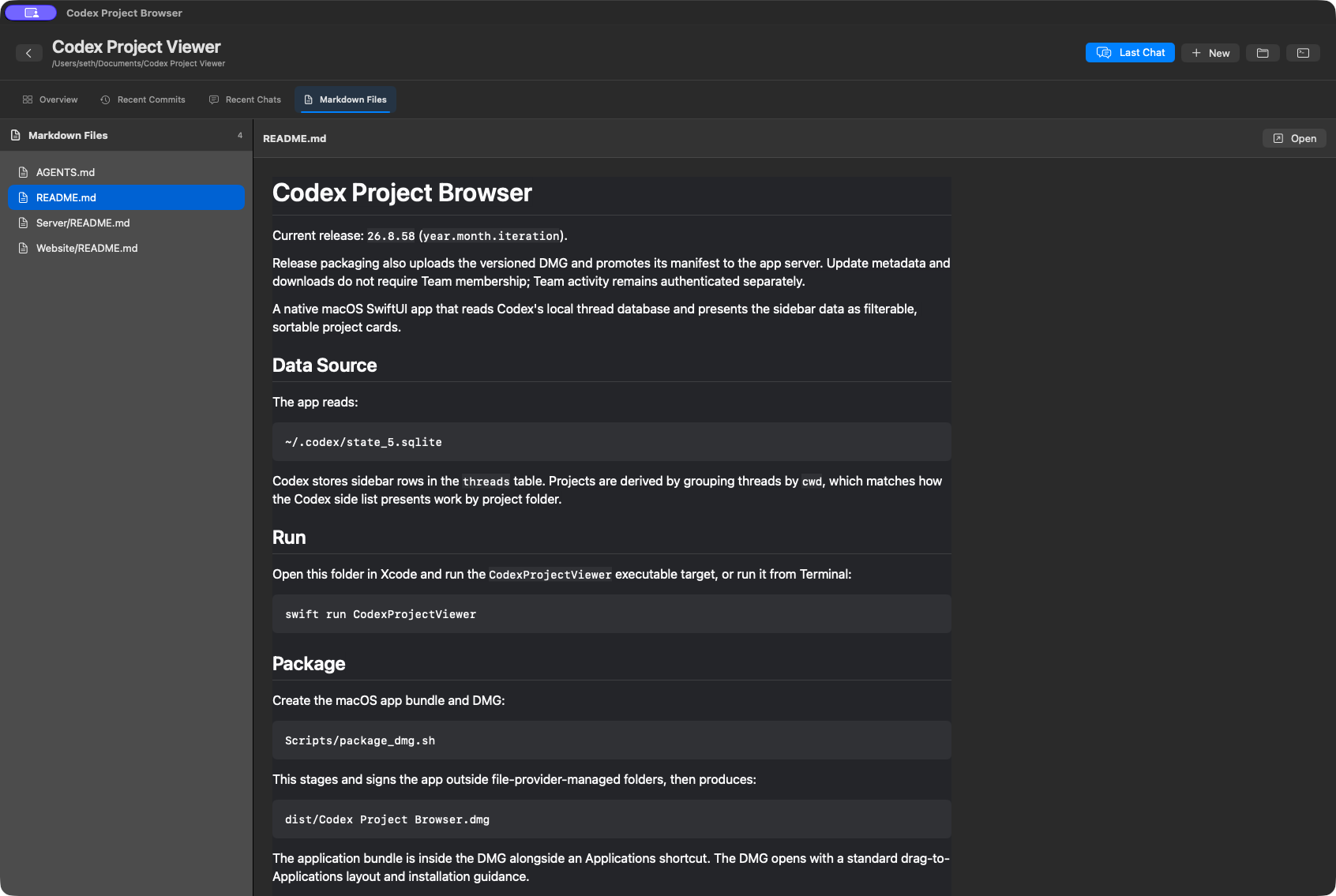
Move from the project list to the context behind it
Each project opens into a focused workspace for usage, repository history, recent chats, and project documentation.
Core features
Enough context to act, without opening every project
Search and organize
Find projects by name, path, branch, chat, or ID. Pin important work, create tags, and filter by unread or processing state.
Open the right context
Return to the latest Codex chat, choose a recent chat, reveal the repository in Finder, or open Terminal at the project path.
Understand repository state
Review branches, changed files, recent commits, Markdown documentation, and visible warnings when a local repository is behind.
Track token usage
See totals across projects, recent token activity, weekly usage, and how much of the weekly balance each project has consumed.
Follow active work
Processing indicators and unread counts help separate work that is running now from completed activity you have not reviewed.
Stay responsive at any size
Use a compact one-column window beside Codex or expand into a broader card grid for scanning a larger project library.
Simple setup
Install it. Open it. Your projects are there.
- Download Open the notarized DMG and drag Project Browser into Applications.
- Allow access Approve access to the folders containing projects you want the app to inspect.
- Start organizing Your existing Codex projects appear automatically, ready to search, tag, pin, and open.
Local first
Your project workspace begins on your Mac.
Project discovery, tags, filters, repository inspection, and personal usage analytics run locally. Team sharing is optional and limited to the project activity described above.
Questions
Project Browser FAQ
Does this replace the Codex app?
No. Project Browser is a companion workspace for organizing projects and opening the appropriate project or recent chat in Codex.
Why not just use the Codex sidebar?
The sidebar remains useful for recent work, but larger project libraries become difficult to scan and organize. The browser adds project cards, search, tags, filters, Git context, and usage analytics while preserving direct links back to Codex.
How does it find my projects?
It reads the local project information maintained by Codex and groups activity by project path and repository.
Can I create my own project tags?
Yes. You can create, rename, and delete tags; assign multiple tags from each project card; and filter the entire workspace by a selected tag.
Are my Codex conversations sent to the team server?
No. Chats, prompts, responses, and thread details are never sent through team sharing.
Will the app keep itself updated?
The app periodically checks for signed releases and displays a New Version control when an update is available.
Is this an official OpenAI product?
No. Project Browser is an independent macOS utility for Codex users and is not affiliated with or endorsed by OpenAI.
Available now for macOS
Bring every Codex project into one clear view.
Requires macOS 13 or later. Version 26.8.64 is signed with Developer ID and notarized by Apple.